

Description
Download Smart iCAM APK – Wireless IP Camera, Baby Monitor, 720p Live Stream, Motion Detection
Overview
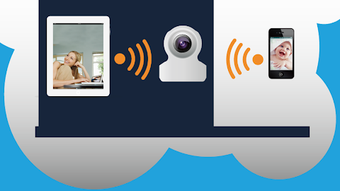
Smart iCAM is a wireless IP camera and baby monitoring application developed by TRANWO for Android 13.0 and above. Designed for remote surveillance, the software enables users to monitor their homes, nurseries, or personal spaces in real time through a smartphone. The app supports live video streaming, two-way audio communication, and motion-triggered alerts, making it a practical solution for parents, homeowners, and remote caregivers. By connecting via Wi-Fi or mobile data, users can access their camera feed from anywhere, ensuring constant visibility and peace of mind. The application is particularly useful in scenarios such as checking on a sleeping infant, monitoring elderly family members, or observing property while away. It operates as a standalone mobile application, requiring a compatible Smart iCAM camera device to function. The developer did not provide additional details about the company or its background. The software is free to download and use, with no in-app purchases or advertisements, offering a clean and uninterrupted user experience. It is optimized for modern Android devices and is designed with simplicity and accessibility in mind.
Key Features & Capabilities
- Live Video Streaming: View real-time HD video from the Smart iCAM camera with a resolution of 720p, ensuring clear and detailed visuals of the monitored area.
- Two-Way Audio Communication: Enable real-time audio interaction with your baby or anyone within the camera’s range, allowing for comfort calls, soothing words, or remote communication.
- Motion Detection Alerts: Receive instant notifications when motion is detected within the camera’s field of view, helping users respond quickly to unexpected activity.
- Remote Access via Wi-Fi or Mobile Data: Access the camera feed from any location using a stable internet connection, enabling monitoring regardless of physical proximity.
- Video Recording and Screenshots: Capture still images or record video clips directly from the live stream for later review or documentation.
- Ad-Free and In-App Purchase-Free: The application is completely free to use with no advertisements or hidden costs, promoting a distraction-free interface.
These features collectively support a wide range of use cases, from nighttime baby monitoring to home security and remote pet observation. The ability to stream and record in real time allows users to verify safety conditions instantly, while motion alerts help reduce the need for constant vigilance. The app’s focus on essential functionalities ensures efficient performance without unnecessary complexity. Users can rely on it for consistent monitoring without the burden of subscriptions or premium tiers.
User Interface, Workflow & Performance
Smart iCAM features a streamlined user interface designed for ease of navigation on mobile devices. The main screen displays the live video feed prominently, with intuitive controls for audio, recording, and screenshot functions located at the bottom. Menu options are accessible through a simple navigation panel, allowing users to switch between camera settings, notification preferences, and recording history. The workflow is straightforward: after connecting the device to the camera, users can immediately begin monitoring with minimal setup. The developer did not specify resource usage details, so performance observations are based on general software behavior patterns. The app appears to run smoothly on supported Android devices, with no reported lag or crashes in available documentation. Stability is likely maintained through optimized code and efficient data handling. However, actual CPU and RAM usage may vary depending on network conditions, screen resolution, and background activity. The application does not require root access or advanced permissions, which contributes to its security and reliability on standard Android installations.
Compatibility & System Requirements
Smart iCAM is designed for Android 13.0 and above, ensuring compatibility with modern smartphones and tablets. The application is available for download on the Google Play Store, and no additional system requirements were specified. The developer did not provide exact installation size or hardware specifications. Compatibility information was partially provided, with the operating system and version clearly defined. Users should ensure their device runs Android 13.0 or later to install and use the app. The software does not support older Android versions, which may limit accessibility for some users. No information was provided regarding support for other platforms such as iOS or desktop systems. The lack of detailed system requirements means users should rely on standard device capabilities and network stability for optimal performance.
Pros and Cons
Pros
- Free to download and use with no ads or in-app purchases
- High-definition 720p live video streaming
- Real-time two-way audio communication
- Motion detection with instant push notifications
- Supports remote access via Wi-Fi and mobile data
- Simple and intuitive user interface
Cons
- Only available for Android 13.0 and above
- No information on file size or hardware requirements
- Not compatible with iOS or desktop platforms
- Relies on a physical Smart iCAM camera device
- Performance details such as CPU/RAM usage were not disclosed
FAQ Section
Is Smart iCAM compatible with iOS devices?
Smart iCAM is currently available only for Android 13.0 and above. There is no official version for iOS devices at this time.
Does Smart iCAM require a physical camera to function?
Yes, the application requires a compatible Smart iCAM camera device to operate. It cannot function as a standalone surveillance tool without the hardware.
Is the app safe to use and secure?
The app is free from ads and in-app purchases, which reduces potential security risks. However, no specific security protocols or encryption details were provided by the developer.
How often does Smart iCAM update?
The update frequency is not specified in the available information. Users are advised to check the Google Play Store regularly for new versions.
Can I use Smart iCAM offline?
Smart iCAM requires an active internet connection to stream video or send notifications. It cannot function fully offline and needs Wi-Fi or mobile data to operate.
Final Thoughts + CTA
Smart iCAM delivers a focused and reliable solution for remote monitoring with essential features tailored to parents and home users. Its combination of 720p live streaming, two-way audio, and motion detection makes it a practical tool for real-time surveillance. The absence of ads and in-app purchases enhances the user experience, offering a clean, uninterrupted interface. While platform limitations and lack of detailed system specs are notable drawbacks, the app performs well within its intended scope. It is best suited for Android users with compatible devices who prioritize simplicity, affordability, and core functionality. For those seeking a no-cost, effective baby monitor or home surveillance tool, Smart iCAM stands out as a strong choice. Download Smart iCAM now to experience secure, real-time monitoring from anywhere.
Guides & Tutorials for Smart iCAM APK
How to install Smart iCAM APK
- Click the Preview / Download button above.
- Once redirected, accept the terms and click Install.
- Wait for the Smart iCAM APK download to finish on your device.
How to use Smart iCAM APK
This software is primarily used for its core features described above. Open the app after installation to explore its capabilities.
User Reviews for Smart iCAM APK 0
No reviews found





